Custom ISO Bootable LIVE USB [8-64GB]
Send us a bootable ISO (or a link to it) and we’ll prepare a reliable, plug-and-boot USB for you. Perfect for custom Linux builds, rescue tools, Windows installers, firmware utilities, education images, and lab environments.
What We Can Build
- Linux live systems: Ubuntu, Mint, Debian, Fedora, Kali, Tails, rescue distros, etc.
- Windows media: official installers / recovery ISOs (license required by you).
- Tools: diagnostics, cloning/imaging, password/reset (lawful use), firmware utilities.
- Education / labs: classroom images, demo environments, training toolkits.
📦 Package / What’s Included
- Bootable USB pre-flashed with your provided ISO (or approved ISO link).
- USB format & bootloader configured for ISO (UEFI and/or Legacy as supported).
- Quick-start card with boot keys and usage tips.
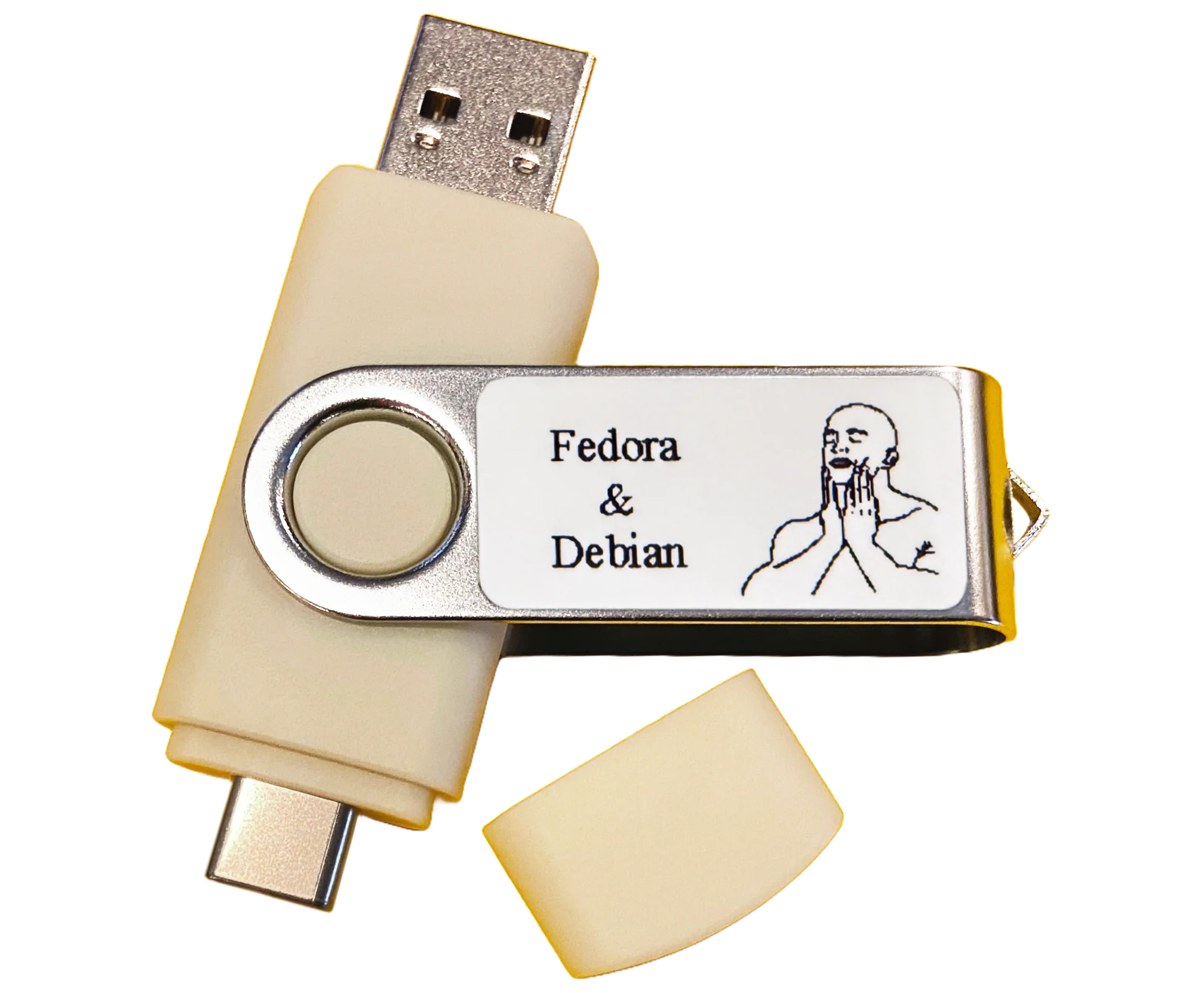
- Custom 0.55'' x 1.18'' (14mm x 30mm) label: Personalize your Bootable USB Thumb Drive with a thermal-printed photo or an image with/or small text like a name or ISO names with/or an icon symbol (you can literally google: "black and white icons" - choose what you like and just send us the image, barcode or a QR code.
*Multi-boot available when compatible with your images. †Persistence available only for ISOs that support it.
🧭 How It Works
- Provide your ISO(s) (upload or send a trusted official link). Include version/edition. Up to a total of 64GB of hard drive space please.
- Tell us your goal: live-only, installer, or both; single-boot or multi-boot request.
- We prepare the USB with the correct partition/bootloader scheme and verify the image hash when available.
-
You boot it: insert USB → power on → press boot-menu key (
F12,Esc,F10, etc.) → select USB.
Want persistence for a Linux live ISO? Mention it — if the ISO supports persistence, we can enable a persistent storage area.
💻 Compatibility & Requirements
- Systems: x86_64 (64-bit) PCs that can boot from USB (UEFI or Legacy BIOS).
- Secure Boot: some PCs may require disabling Secure Boot to start external media.
- Windows installers: you must supply a valid license for activation after install.
- macOS installers: limited to Apple.
🧰 Multi-Boot & Persistence Notes
- Multi-boot: Some ISOs can share one USB with a boot menu. Others require dedicated drives.
- Persistence: Not all Linux Live ISOs support persistent storage. When supported, persistence saves files and settings between reboots and uses part of the USB’s available space. For the most reliable results, persistence is provided on a single-OS USB that boots directly into that Linux system.
- Large ISOs: We’ll choose file systems/partitions to accommodate files & boot mode limits.
⚠️ Legal & Safety
- Provide legitimate, unmodified ISOs from official/authorized sources.
- You are responsible for appropriate licensing (e.g., Windows) and lawful use.
- No pirated, malware-laden, or illegal content will be accepted.
🛠️ Support
Questions? Message Us
Want the “ultimate” multi-boot USB instead?
If you want our best ready-to-boot multi-tool USB (Linux + Windows installers + repair tools + extras), check these out:
Ultimate Penguin USB (128GB) Ultimate Tech USB (128GB)Prefer a fully custom build? Stay on this page and send us your ISO(s).
Note: This listing is a service to prepare a bootable USB using your provided ISO. It does not include software licenses. Boot capabilities depend on the ISO and target hardware.
Product Information
Product Information
Shipping & Returns
Shipping & Returns
Description
Send us a bootable ISO (or a link to it) and we’ll prepare a reliable, plug-and-boot USB for you. Perfect for custom Linux builds, rescue tools, Windows installers, firmware utilities, education images, and lab environments.
What We Can Build
- Linux live systems: Ubuntu, Mint, Debian, Fedora, Kali, Tails, rescue distros, etc.
- Windows media: official installers / recovery ISOs (license required by you).
- Tools: diagnostics, cloning/imaging, password/reset (lawful use), firmware utilities.
- Education / labs: classroom images, demo environments, training toolkits.
📦 Package / What’s Included
- Bootable USB pre-flashed with your provided ISO (or approved ISO link).
- USB format & bootloader configured for ISO (UEFI and/or Legacy as supported).
- Quick-start card with boot keys and usage tips.
- Custom 0.55'' x 1.18'' (14mm x 30mm) label: Personalize your Bootable USB Thumb Drive with a thermal-printed photo or an image with/or small text like a name or ISO names with/or an icon symbol (you can literally google: "black and white icons" - choose what you like and just send us the image, barcode or a QR code.
*Multi-boot available when compatible with your images. †Persistence available only for ISOs that support it.
🧭 How It Works
- Provide your ISO(s) (upload or send a trusted official link). Include version/edition. Up to a total of 64GB of hard drive space please.
- Tell us your goal: live-only, installer, or both; single-boot or multi-boot request.
- We prepare the USB with the correct partition/bootloader scheme and verify the image hash when available.
-
You boot it: insert USB → power on → press boot-menu key (
F12,Esc,F10, etc.) → select USB.
Want persistence for a Linux live ISO? Mention it — if the ISO supports persistence, we can enable a persistent storage area.
💻 Compatibility & Requirements
- Systems: x86_64 (64-bit) PCs that can boot from USB (UEFI or Legacy BIOS).
- Secure Boot: some PCs may require disabling Secure Boot to start external media.
- Windows installers: you must supply a valid license for activation after install.
- macOS installers: limited to Apple.
🧰 Multi-Boot & Persistence Notes
- Multi-boot: Some ISOs can share one USB with a boot menu. Others require dedicated drives.
- Persistence: Not all Linux Live ISOs support persistent storage. When supported, persistence saves files and settings between reboots and uses part of the USB’s available space. For the most reliable results, persistence is provided on a single-OS USB that boots directly into that Linux system.
- Large ISOs: We’ll choose file systems/partitions to accommodate files & boot mode limits.
⚠️ Legal & Safety
- Provide legitimate, unmodified ISOs from official/authorized sources.
- You are responsible for appropriate licensing (e.g., Windows) and lawful use.
- No pirated, malware-laden, or illegal content will be accepted.
🛠️ Support
Questions? Message Us
Want the “ultimate” multi-boot USB instead?
If you want our best ready-to-boot multi-tool USB (Linux + Windows installers + repair tools + extras), check these out:
Ultimate Penguin USB (128GB) Ultimate Tech USB (128GB)Prefer a fully custom build? Stay on this page and send us your ISO(s).
Note: This listing is a service to prepare a bootable USB using your provided ISO. It does not include software licenses. Boot capabilities depend on the ISO and target hardware.