Ubuntu Bootable USB – Fast, Secure & User-Friendly Linux Operating System for PC
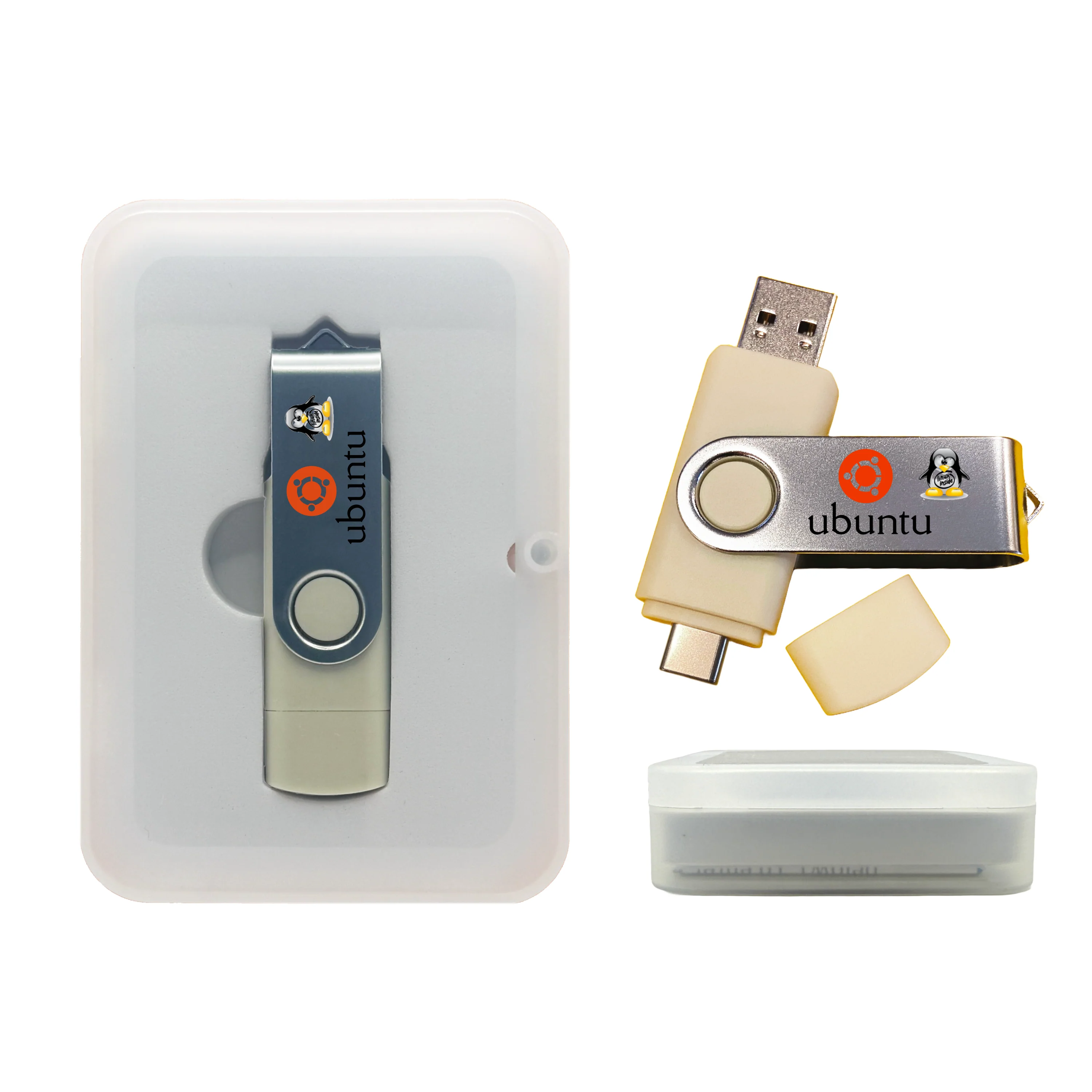
Boot Ubuntu from USB and turn almost any compatible PC into a powerful, modern Linux system — without touching the existing hard drive unless you choose to install. This USB includes both amd64 and arm64 Ubuntu installers, making it flexible for a wider range of hardware.
🧰 What You Can Do
- Run Ubuntu Live from USB without installing anything.
- Install Ubuntu (amd64 or arm64) to an internal drive if you choose.
- Browse safely using a clean Linux environment.
- Use office, coding, and productivity apps for work, school, or personal use.
- Troubleshoot and access files on systems where the installed OS is damaged or slow.
- Learn Linux using one of the most popular distributions in the world.
📦 What's Included
- Bootable Ubuntu Live USB with installer and full desktop environment.
- Dual USB-A / USB-C connector flash drive (USB 2.x, works in USB 3.0 ports).
-
Both installer types included:
- amd64 – for Intel/AMD 64-bit PCs
- arm64 – for compatible ARM-based PCs
- Basic boot tips & key guide.
- Packaging: standard (Clear Box) or gift (Tin Case).
💻 Compatibility & Requirements
- amd64 installer: Most Intel/AMD 64-bit PCs with UEFI or Legacy BIOS.
- arm64 installer: Supported ARM-based PCs capable of USB booting.
- Ports: USB 2.0/3.x; keyboard & mouse recommended.
- Storage: Optional install requires free space on internal drive or a second drive.
- Note: arm64 mode is not for phones, ARM Chromebooks, or locked bootloader devices. Not for ARM-only Macs.
⚙️ How to Boot
Insert USB, power on, press your boot-menu key (e.g., F12, Esc, F10, F2, Del).
Select the USB device and choose Ubuntu from the boot menu.
Use it Live or install Ubuntu to an internal drive if you prefer.
Help & Tutorials:
help.techstoreon.com
— boot keys, USB booting guides, and troubleshooting.
♻️ Give Your Old PC a Second Life
Ubuntu is an excellent way to revive older PCs that feel slow under their original operating system.
Why This Matters
- Reduces electronic waste by reusing working hardware.
- Gives aging laptops/desktops a modern, fast OS experience.
- Great for school computers, family PCs, and spare systems.
How This USB Helps
- Test Ubuntu Live before installing anything.
- Install Ubuntu to turn an old PC into a fast web/office/coding machine.
- Use it as a rescue environment when Windows won’t boot.
Perfect for:
- Reusing older laptops/desktops.
- Preparing refurbished PCs for donation or resale.
- Creating a clean, fast system for learning or secure browsing.
🔧 Customizable USB (Optional)
This Ubuntu USB may be customizable within technical and licensing limits. Examples of what may be possible:
- Adding or removing certain open-source Linux utilities.
- Preloading additional Linux apps commonly used in your workflow.
For details, see our customization guide:
https://www.techstoreon.com/pages/customize
Custom options may require extra time or cost; some components cannot be customized due to licensing or technical restrictions.
🛠️ Support
Need help or have questions? Message Us .
Original: $19.99
-70%$19.99
$6.00Product Information
Product Information
Shipping & Returns
Shipping & Returns
Description
Boot Ubuntu from USB and turn almost any compatible PC into a powerful, modern Linux system — without touching the existing hard drive unless you choose to install. This USB includes both amd64 and arm64 Ubuntu installers, making it flexible for a wider range of hardware.
🧰 What You Can Do
- Run Ubuntu Live from USB without installing anything.
- Install Ubuntu (amd64 or arm64) to an internal drive if you choose.
- Browse safely using a clean Linux environment.
- Use office, coding, and productivity apps for work, school, or personal use.
- Troubleshoot and access files on systems where the installed OS is damaged or slow.
- Learn Linux using one of the most popular distributions in the world.
📦 What's Included
- Bootable Ubuntu Live USB with installer and full desktop environment.
- Dual USB-A / USB-C connector flash drive (USB 2.x, works in USB 3.0 ports).
-
Both installer types included:
- amd64 – for Intel/AMD 64-bit PCs
- arm64 – for compatible ARM-based PCs
- Basic boot tips & key guide.
- Packaging: standard (Clear Box) or gift (Tin Case).
💻 Compatibility & Requirements
- amd64 installer: Most Intel/AMD 64-bit PCs with UEFI or Legacy BIOS.
- arm64 installer: Supported ARM-based PCs capable of USB booting.
- Ports: USB 2.0/3.x; keyboard & mouse recommended.
- Storage: Optional install requires free space on internal drive or a second drive.
- Note: arm64 mode is not for phones, ARM Chromebooks, or locked bootloader devices. Not for ARM-only Macs.
⚙️ How to Boot
Insert USB, power on, press your boot-menu key (e.g., F12, Esc, F10, F2, Del).
Select the USB device and choose Ubuntu from the boot menu.
Use it Live or install Ubuntu to an internal drive if you prefer.
Help & Tutorials:
help.techstoreon.com
— boot keys, USB booting guides, and troubleshooting.
♻️ Give Your Old PC a Second Life
Ubuntu is an excellent way to revive older PCs that feel slow under their original operating system.
Why This Matters
- Reduces electronic waste by reusing working hardware.
- Gives aging laptops/desktops a modern, fast OS experience.
- Great for school computers, family PCs, and spare systems.
How This USB Helps
- Test Ubuntu Live before installing anything.
- Install Ubuntu to turn an old PC into a fast web/office/coding machine.
- Use it as a rescue environment when Windows won’t boot.
Perfect for:
- Reusing older laptops/desktops.
- Preparing refurbished PCs for donation or resale.
- Creating a clean, fast system for learning or secure browsing.
🔧 Customizable USB (Optional)
This Ubuntu USB may be customizable within technical and licensing limits. Examples of what may be possible:
- Adding or removing certain open-source Linux utilities.
- Preloading additional Linux apps commonly used in your workflow.
For details, see our customization guide:
https://www.techstoreon.com/pages/customize
Custom options may require extra time or cost; some components cannot be customized due to licensing or technical restrictions.
🛠️ Support
Need help or have questions? Message Us .